























Land more interviews with our FREE tools. Click To Get Your Free Resume Score
  • Home
  • Blog
  • Skills Section Of Resume: How To Tailor It For Any Job [+Examples]
28 May 2025 Paula Martins

Skills Section Of Resume: How To Tailor It For Any Job [+Examples]

The skills section of your resume might seem like a small detail — even a dismissible one.  But the truth is, it can have a massive impact on whether your application makes it past the ATS and into the hands of a real human.

If you've never heard of ATS, it stands for Applicant Tracking System — software recruiters use it to filter candidates that best match the job description by scanning specific skills, experience, and keywords on their resume.

This means if your resume isn't optimized for ATS, it might not get to the right people (even if you are the best candidate for the role)!

And a big part of optimizing your resume for ATS is adding a solid skills section.

Here’s the thing, though: most job seekers treat this section like an afterthought.

They copy and paste a generic list of buzzwords or skills they think are impressive, without being mindful about what the role actually requires.

And that’s the key — your skills section isn’t just about showing what you’re good at. It’s about showing that you’re a match for the job you’re applying for.

In this guide, we’ll break down exactly how to craft a skills section that gets noticed, how to tailor it for every job, and how to back it up with the rest of your resume.

The sections of this article include:

  1. What is The Skills Section Of A Resume?
  2. How To Add The Right Skills Based On Your Target Role (With Examples)
  3. Skills Section Complete? Use These Tools To Build A Job-Winning Resume
  4. Key Takeaways

Let's get started!

What Is The Skills Section Of A Resume?

The skills section is a dedicated area of your resume where you highlight your core knowledge related to the role. In other words, the tools, technologies, and abilities that qualify you for the job.

The skills section is usually presented as a clean, easy-to-scan list of keywords, often placed at the top, side, or bottom of your resume.

While simple in format, it plays a big role in helping your resume pass the ATS filters that scan for specific keywords from the job description.

It also helps recruiters quickly verify whether you have the fundamental qualifications for the role before they dig deeper into your work history!

Here’s an example of what the skills section might look like on a resume for a Marketing Manager role:

  • Marketing Strategy Development
  • Digital Marketing
  • Content Marketing
  • SEO
  • Social Media Management
  • Campaign Management
  • Email Marketing (e.g., Mailchimp, HubSpot)
  • Marketing Analytics (e.g., Google Analytics, GA4, Looker Studio)
  • CRM Platforms (e.g., Salesforce, HubSpot)
  • Cross-Functional Team Leadership

Simple, right? But here’s the catch — simply listing skills isn’t enough. The key is making sure they have the right skills for the job you want.

How To Add The Right Skills Based On Your Target Role (With Examples)

Most resumes fail because they aren’t tailored to the job description.

Imagine you are applying for a Content Marketing Manager role at a SaaS company — let's call it BrightLoop.

This is what they are asking in their job description:

Content Marketing Manager
Location: Remote (Global)
Job Type: Full-time

About Us
At BrightLoop, we believe that great content drives meaningful connections. Our SaaS platform helps businesses automate customer journeys with simplicity and precision. We're looking for a Content Marketing Manager to own and elevate our brand voice, crafting compelling narratives that drive awareness, engagement, and customer growth.

What You'll Do
As a Content Marketing Manager, you’ll be the architect of our content strategy—turning ideas into assets that support the entire customer lifecycle. You’ll work closely with Product Marketing, Demand Generation, and Sales to deliver high-impact content that educates, inspires, and converts.

Responsibilities

  • Develop and execute a content strategy that aligns with brand goals and drives traffic, engagement, and leads
  • Manage the editorial calendar and oversee content production across formats: blogs, whitepapers, case studies, email campaigns, video scripts, and social media
  • Collaborate with internal stakeholders (product, sales, customer success) to develop content that supports launches, campaigns, and enablement
  • Write, edit, and optimize high-quality content for SEO, brand voice, and conversion goals
  • Leverage AI tools to improve efficiency in content creation, research, and repurposing
  • Analyze content performance using tools like Google Analytics, HubSpot, and SEO platforms, adjusting strategies as needed
  • Manage freelance writers, designers, and video creators when necessary
  • Stay up-to-date with content trends, SEO best practices, and competitors to ensure our content stays fresh and competitive

Requirements

  • 3–5 years of experience in content marketing, preferably in B2B SaaS or tech
  • Exceptional writing, editing, and storytelling skillsExperience building and executing content strategies that drive measurable resultsProficiency in SEO principles, content analytics, and marketing automation platforms (e.g., HubSpot, Marketo
  • Strong project management skills with the ability to juggle multiple projects and deadlines
  • Comfortable using AI tools to support content creation and productivity
  • A collaborative mindset, with the ability to work cross-functionally with marketing, product, and sales teams

And your resume includes the following skills section:

  • Content Writing & Editing
  • SEO
  • Social Media Management
  • Marketing Analytics (e.g., Google Analytics, GA4)
  • CMS (e.g., WordPress)

Looks good, right?

Sure, you've got some of the main skills in there. But you are also missing hard skills like:

  • Product
  • Sales
  • Brand
  • AI Tools
  • Hubspot
  • Video
  • SaaS

And those are all skills that are required in the job description!

Even if you don't master all of these skills, it's still nice to know what areas you can upskill and improve.

Now, you might be asking yourself:

“Okay, so what should I put in the skills section of my resume, and how do I know what skills fit the job description?”

Well, it's easier than you think!

Here’s a step-by-step process to help you do it:

Step 1: Grab The Job Description For Your Target Role

Start with the job description for the exact role you’re applying for. This document isn’t just a summary of the job — it’s a cheat sheet that tells you exactly what the company is looking for in a candidate.

Step 2: Run The Job Description Through ResyMatch.io

ResyMatch.io is a free resume scanner that compares your resume with the job description and matches it for existing keywords.

Even if you don't have a resume, you can simply scan the job description with ResyMatch.io and find out the main hard and soft skills the company is looking for in the ideal candidate, and optimize your resume with the right amount of keywords!

Head over to ResyMatch.io, upload your resume, and copy and paste the job description to find out the missing gaps:
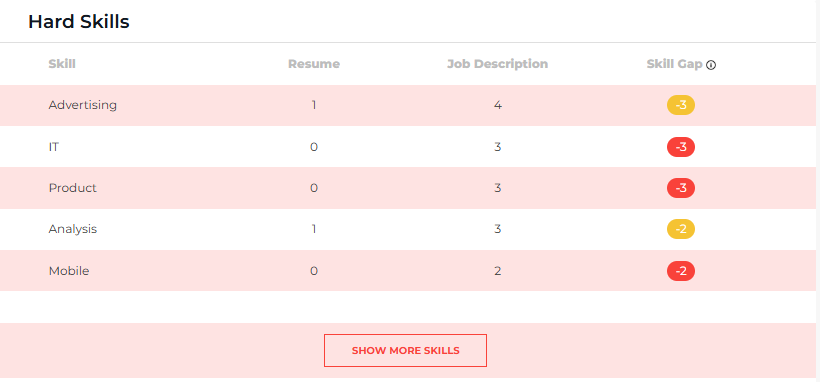
ResyMatch Skill Gap 2025

Or simply select “Job Description Scanner” and paste the job description if you don't have your resume with you!

You can also use the shortcut below to get started:

Step 1

Copy/paste or upload your resume here:

Click here to paste text

or

Upload a PDF, Word Doc, or TXT File

UPLOAD RESUME
Step 2

Paste the job post's details here:

Step 3

Scan to compare and score your resume vs the job's description.

START RESUME SCAN
Or see a sample resume scan

Step 3: Optimize Your Skills Section

Now that you’ve pulled the right skills from the job description using ResyMatch.io, it’s time to update your resume.

Your goal here is simple: make it crystal clear to both the ATS and the hiring manager that you have the skills needed for the role.

Here’s how to do it:

  • Focus on the most relevant skills. Prioritize the skills that are repeated in the job description or listed under “Requirements” and “Qualifications.”
  • Match the language exactly. If the job description says “Cross-Functional Collaboration,” use that, not “Teamwork” or “Working with others.” This helps your resume pass the ATS scan and resonates better with recruiters.
  • List 5–10 key skills. Keep it clean and scannable. A good mix of technical skills (like tools and platforms) and core competencies (like project management or communication) works best.
  • Be honest. Only add the skills you actually have. The goal is alignment, not keyword stuffing.

Once your skills section is optimized, you’re not just showing what you’re good at: you’re showing that you’re the right person for this specific job.

Step 4: Proofread Your Resume (Yes, Even Your Skills Section)

Once you’ve optimized your resume with the right skills, tools, and keywords, it’s time to double-check your work.

It sounds simple, but proofreading is one of the most overlooked steps — and one of the easiest ways to accidentally sabotage a great resume.

Here’s what to look for:

  • Spelling errors: This includes obvious typos but also tool names (e.g., HubSpot, not Hubspot) and certifications.
  • Formatting consistency: Are your bullet points aligned? Are fonts and text sizes consistent?
  • Keyword accuracy: Double-check that the skills listed match the exact language used in the job description, where possible.

To make things easier, can use an app like Grammarly to easily spot these issues throughout your resume.

A clean, error-free resume signals attention to detail — something every employer values.

Step 5: Refresh For Every Job You Apply To

This is the step most job seekers skip — and it’s one of the most important.

Every job description is slightly different. Even if the title is the same, one company might prioritize content creation while another focuses on analytics or product enablement.

If you send the same resume to every job, you’re almost guaranteed to miss key opportunities to align your skills with the role.

Here’s how to make refreshing easier:

  • When you find a new job posting, scan it with ResyMatch.io to instantly spot new keywords and skill priorities.
  • Update your skills section to reflect those keywords, making sure they match your experience.
  • Quickly review your summary and bullet points to highlight the most relevant accomplishments for that specific role.

It might feel like extra work, but tailoring your resume for each job is one of the highest ROI tasks in your job search. It dramatically increases your chances of getting through ATS filters and landing interviews.

Skills Section Complete? Use These Tools To Build A Job-Winning Resume

Your skills section is only one part of the story. If you want a resume that gets noticed, the rest of your document needs to be just as strong.

1. Write Impactful Resume Bullets With ResyBullet

Your skills tell the recruiter what you can do. Your experience tells them how you’ve done it — and what impact you’ve had.

ResyBullet.io helps you write powerful, results-driven bullets that showcase your achievements and outcomes, not just your responsibilities.

For example, instead of:

“Managed marketing campaigns for multiple clients.”

Use something like:

“Led 5+ marketing campaigns that increased client revenue by 27% on average.”

Better, right? That’s the power of measurable impact!

This is what our second bullet point scored on ResyBullet:
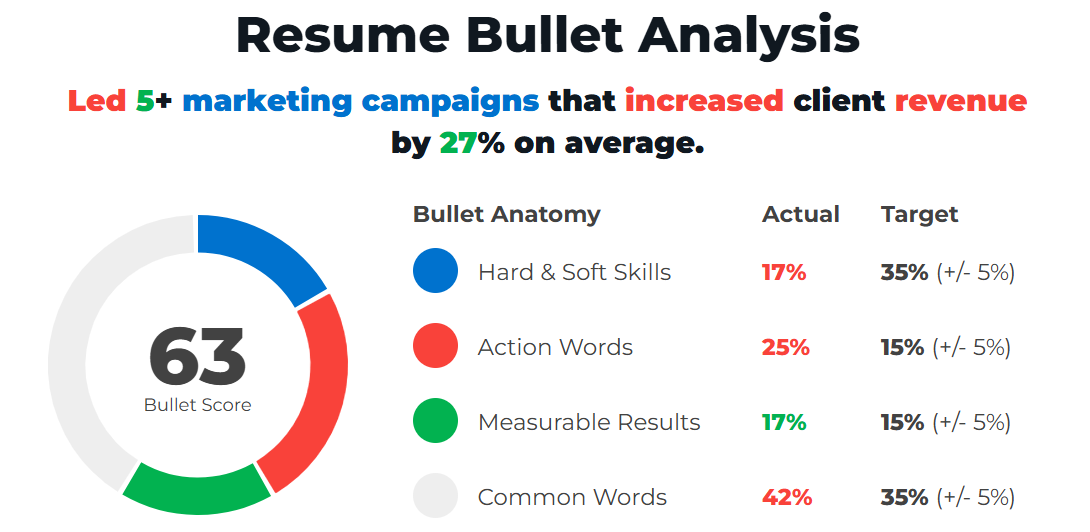
Skills For Resume - ResyBullet Example

If you need help writing your resume bullet, this video walks through an easy step-by-step:

Use the shortcut below to get started:

Free Resume Bullet Analyzer

Learn to write crazy effective resume bullets that grab attention, illustrate value, and actually get results.

Copy and paste your resume bullet to begin analysis:
Click To Analyze!

2. Craft A Professional, ATS-Friendly Resume With ResyBuild.io

Even the best-written resume can get rejected if it’s poorly formatted.

ResyBuild.io is a resume builder that offers clean, professional templates designed to pass ATS filters while being easy for hiring managers to read.

Choose from 8 proven templates and easily create, edit, and customize your resume. ResyBuild's AI assistant also helps you craft personalized, job-winning bullets in a single click. Simply add your experience, hit “Optimize”, and watch the magic happen.
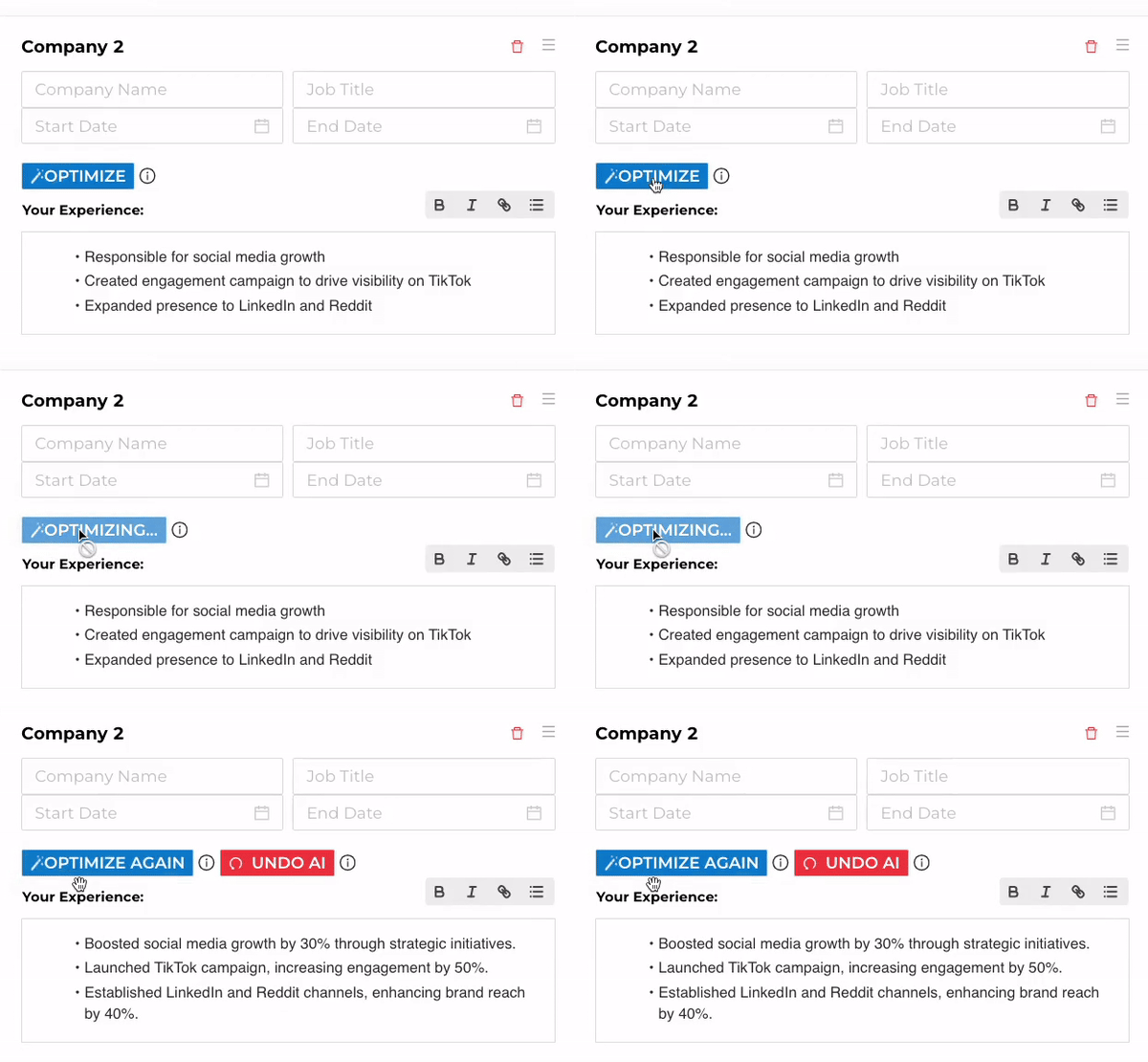
ResyBuild AI Optimizer

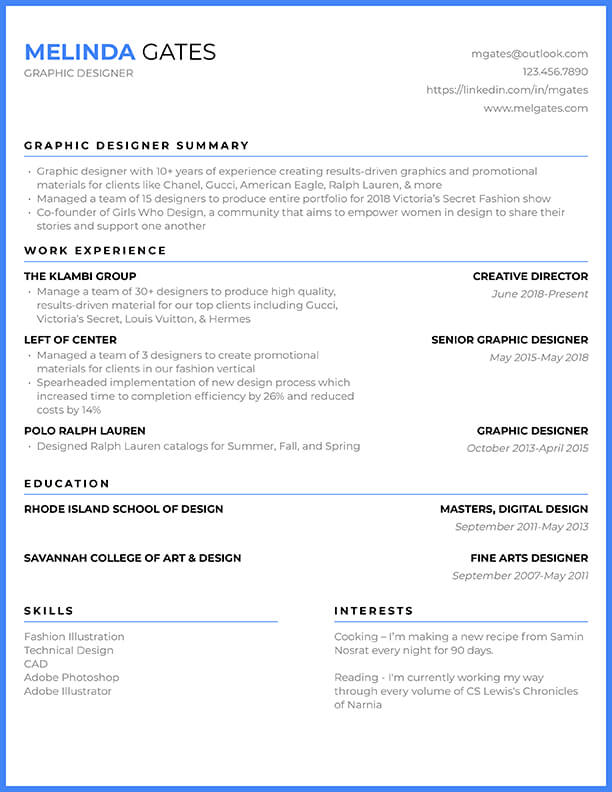
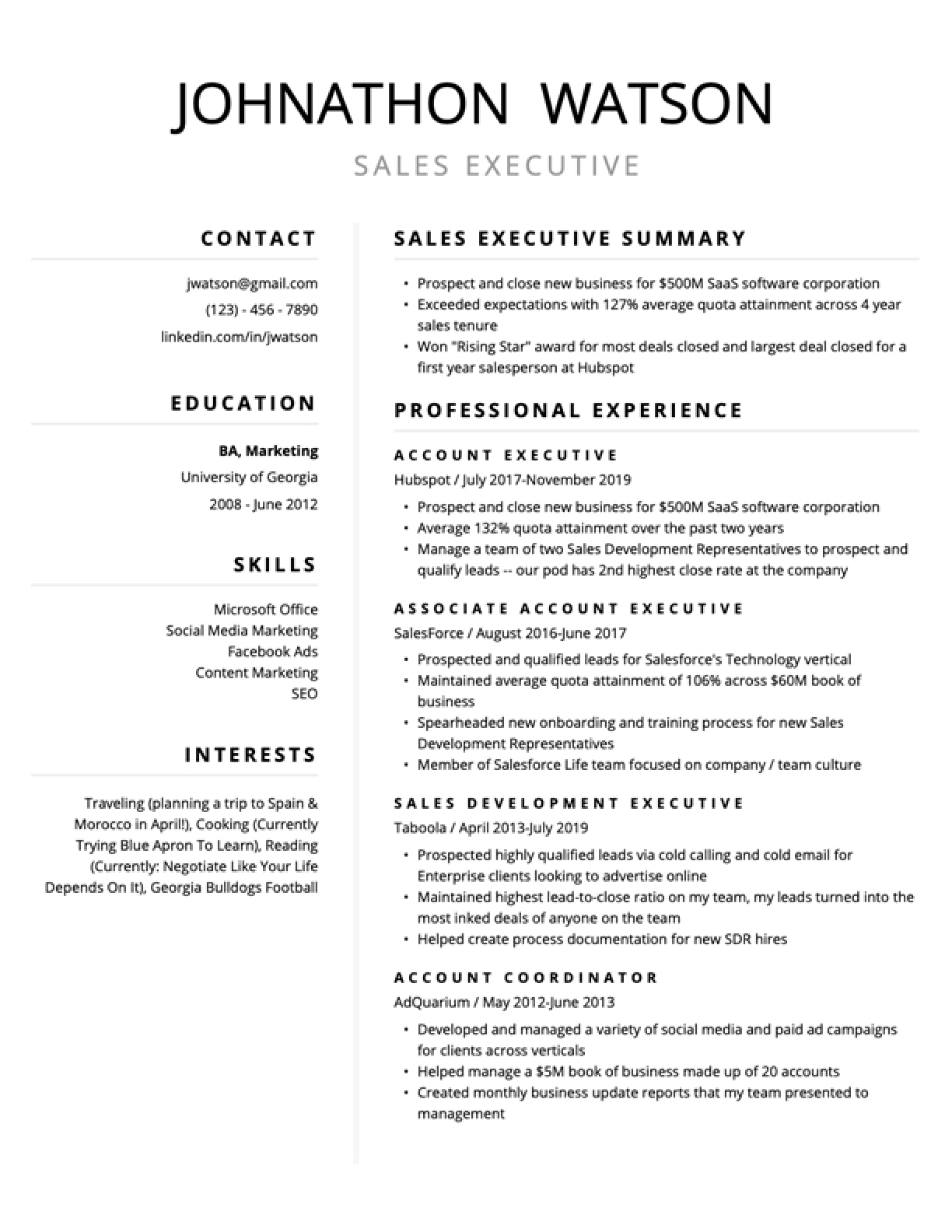
Choose a template below to get started:

Free Job-Winning Resume Templates, Build Yours In No Time.

Choose a resume template below to get started:
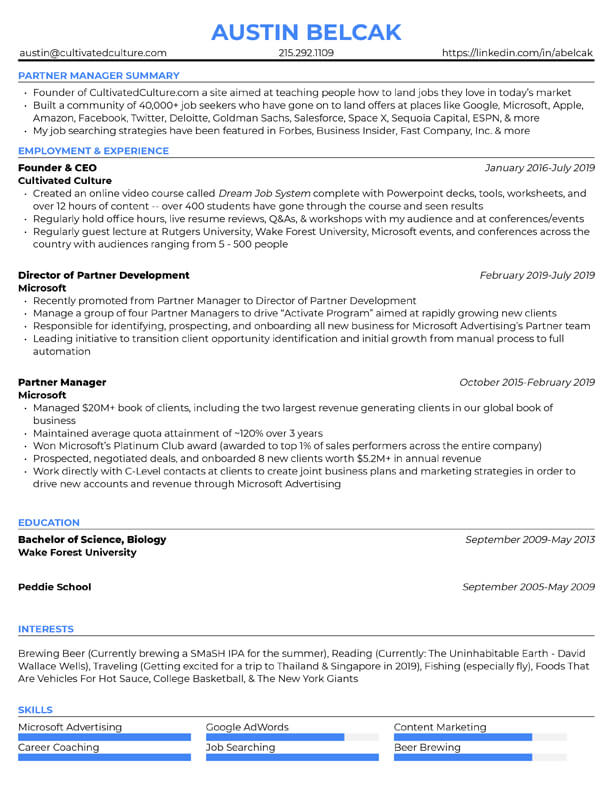
Key Takeaways: How To Tailor The Skills Section Of Your Resume (Step-by-Step)

Want the TL;DR? Here’s a step-by-step recap of how to craft a job-winning skills section that actually gets you interviews.

  1. Grab the job description. This is your blueprint. It tells you exactly what skills, tools, and qualifications the company is looking for.
  2. Scan it with ResyMatch.io. Use ResyMatch.io to pull out the keywords, hard skills, soft skills, and tools mentioned in the job description.
  3. Optimize your skills section. Add the most relevant skills from the job description to your resume, focusing on the ones you actually possess. Match the language wherever possible.
  4. Proofread your resume. Double-check for spelling, formatting, and keyword accuracy. Make sure your skills are honest and clearly presented.
  5. Refresh for every job. Repeat this process each time you apply. Every job has slightly different priorities, and a tailored resume gets more interviews.

When your skills section is customized — and supported by strong bullet points, a clean format, and ATS-friendly keywords — your resume does exactly what it’s supposed to do: get you in the door for interviews!

Paula Martins

Paula is Cultivated Culture's amazing Editor and Content Manager. Her background is in journalism and she's transitioned from roles in education, to tech, to finance, and more. She blends her journalism background with her job search experience to share advice aimed at helping people like you land jobs they love without applying online.

LEAVE A REPLY

YOU’VE SEEN AUSTIN IN

Fast Company Logo
Business Insider Logo
Inc. Logo
The Muse logo
Cultivated Culture
SIGN UP
LOG IN
Cultivated Culture ResyBullet ResyBuild Mailscoop HeadlineAnalyzer.io
Appcompass

APPCOMPASS.IO

Welcome Back To Cultivated Culture!

Log into your Cultivated Culture account using one of the options below:

Welcome Back!

Log into your account to pick up where you left off!:

You have exceeded the maximum number of phone messages in a 24 hour period. We limit the number of times you can request security codes in order to protect your security. Please try again later or contact us for assistance with accessing your account.

Sign in with LinkedIn
Sign in with Email
LOG IN

Forgot your password? Click here to reset.

Need a free acount? Click Here To Sign Up

By logging in, you agree to Cultivated Culture's Terms of Use, Privacy Policy, and agree to receive email updates.

One Free Account, Four Job-Winning Tools

Sign up for a free Cultivated Culture account and get access to all of our job search tools:

Your Bullet Score is:

Sign up for a free Cultivated Culture account to get the full breakdown of your bullet along with suggestions for improving it:

Sign Up To Save & Export Your Resume

Sign up to create, save, and export your resume and get access to our suite of job search tools!

Sign Up To Get More Free Email Searches

Create a free account to unlock more email searches and get access to all four of our job-winning tools:

Your Headline Score is:

Sign up for a free Cultivated Culture account to get the full breakdown of your headline along with suggestions for improving it:

Hey There! Create A Free Account To Get Started.

Choose an option below to create a free account to begin adding your own job search data:

Sign up with LinkedIn
Sign up with Email
Sign Up

Already have an acount? Click Here To Log In

By logging in, you agree to Cultivated Culture's Terms of Use, Privacy Policy, and agree to receive email updates.

SIGN UP
LOG IN
Cultivated Culture

We Just Need You To Verify Your Email.

We just emailed you a 6-digit code. Please check your email and enter it below.

Note: Your progress will not be saved until your email is verified. Closing this pop up or window might cause you to lose your progress.

Invalid Code

Verify

Choose one of the options below to get the verification code we sent you!

We'll need you to verify your email address before you're able to unlock free scans.

We'll need you to verify your email address before you're able to unlock free templates, saves, and exports.

We'll need you to verify your email address before you're able to unlock free email searches.

We sent a verification code to your email, all you have to do is paste that code here and submit to get full access!

Resend Verification Email
Verify Your Account Now

Need a free acount? Click Here To Sign Up

By logging in, you agree to Cultivated Culture's Terms of Use, Privacy Policy, and agree to receive email updates.

Cultivated Culture

Looks Like You Still Need To Verify Your Email Address!

Whoops! Looks like you still haven't verified your email address. We'll need you to do that before granting free, unlimited access to our tools.

If you can't find the original verification email, click the link below and we'll send a new one:

Sent! Please check your email.

Resend Verification Email

Need a free acount? Click Here To Sign Up

By logging in, you agree to Cultivated Culture's Terms of Use, Privacy Policy, and agree to receive email updates.

Cultivated Culture

Oops! You've Hit Your Credit Limit.

Looks like you've used all 7 of your free credits for the month. Your credit limit will refresh in days. You can learn more about your credit limit here.


Want to stop worrying about credits?

Sign up for our Unlimited plan to get instance unlimited access to all of our jon search tools for one low price. Click below to learn more:

LEARN ABOUT UNLIMITED

Unlock All Six Tools To Land Interviews Faster!

Change Plan!

Get full access to dial in your job search materials and start landing more interviews.

Unlock All Six Tools To Land Interviews Faster!
(& Save 10%)!

Get full access to dial in your job search materials and start landing more interviews, and 10% off our regular pricing thanks to your friend :

Discount Unlocked!

Get 22% off any Unlimited Plan when you upgrade in the next 24 hours!

$7 $7 $6.30 $7 $5.50

Today, then $7 every week

(Automatically renews until cancelled)

Weekly

Monthly

(Save ~40%)

Quarterly

(Save ~50%)

Our Unlimited plan helps you:

Remove limits on resume exports, scans, cover letters, LinkedIn headlines, AI generations, & more.

Find verified emails for up to 200 hiring managers each week

Unlock Prioriy Support from our team

No obligations - cancel any time in one click

UPGRADE MY PLAN
UPGRADE WITH DISCOUNT
CHANGE PLAN

HOURS

MINS

SECS

This is a recurring subscription. You can cancel any time in one click from your dashboard. By clicking "Upgrade My Plan," you agree to Cultivated Culture's Terms of Service and Privacy Policy

This is a recurring subscription. You can cancel any time in one click from your dashboard. By clicking "Change Plan," you agree to Cultivated Culture's Terms of Service and Privacy Policy

Real Results From Job Seekers Like You:

Cultivated Culture

Confirm Your Plan Change

Here is a summary of your plan change:

Current Plan:

New Plan:

Please note the following for plan changes:

Your new plan and rebill date will be effective immediately

The number above depict retail plan pricing, any adjustments or credits will be available in the Invoices section of your Billing tab

If you're moving to a lower cost plan, the difference will be credited to your account and applied towards your next payment

CONFIRM PLAN CHANGE

By clicking "Confirm Plan Change," you agree to Cultivated Culture's Terms of Service and Privacy Policy

Cultivated Culture

Unlimited Plan Upgrade

Change Payment Method

APPLY

Promo code has been applied to your purchase!

Note: This is a weekly subscription, your card will be automatically charged every week until you cancel your plan.

Terms of Use | Privacy Policy

(C) 2024 Cultivated Culture

Note: You will not be charged for updating your credit card using this form. After your new card is added, you will be billed on the date of your next billing cycle.

Cultivated Culture

Upgrade Complete!

You are officially a

Unlimited Member

Invoice Details

Invoice:

Paid Today:

Plan:

Start Date:

Subscription:

Next Bill Date (Est.):

Note: This receipt and future invoices will be available in the Billing Tab of your Account Dashboard.

VIEW RECEIPT
RETURN TO TOOLS

Terms of Use | Privacy Policy

(C) 2024 Cultivated Culture

Cultivated Culture

Do You Want To Secure Your Account?

Increase your account security with one of our multi-factor authentication options:

Set Up 2 Factor Authentication
Skip Adding Additional Security
Note: You are able to set up multi-factor authentication at any time in your Account Dashboard.

Choose An Authentication Method

Awesome! Let's make your account more secure.

Choose your preferred authentication method:

Text Message Authentication
Email Address Authentication

Text Message Authentication

Enter the phone number that you want to use to set up text-based authentication for your account:

You have exceeded the maximum number of phone messages in a 24 hour period. We limit the number of times you can request security codes in order to protect your security. Please try again later or contact us for assistance with accessing your account.

SEND CODE

Note: Message and data rates may apply. Your phone number will only be used to send authentication codes. You will receive one message per login attempt. For more information, click here to view our Terms of Use and Privacy Policy

Text Message Verification Code Sent!

Please check your phone for verification code and enter below:

VERIFY

Email Verification Code Sent!

Please check your email for verification code and enter below:

VERIFY

Choose An Authentication Method

No problem, we'll skip this for now. Do you want us to remind you to secure your account?

Yes, Remind Me Next Time
No, Don't Remind Me Again
Note: You are able to set up multi-factor authentication at any time in your Account Dashboard.

Terms of Use | Privacy Policy

(C) 2024 Cultivated Culture

Cultivated Culture

Welcome !

It's great to have you. We just have a few questions so we can personalize your experience with our tools:

GET STARTED!
Skip For Now
Cultivated Culture

Join A Live Weekly Strategy Sessions:


4 Steps To Win Job Offers In Today's "Impossible" Market

Congrats! You officially have access to an ecosystem of job search tools that's going to help you accelerate your job search.

The next step? Grab a seat for one of our live weekly strategy sessions where we break down 4 strategies our clients are using to achieve:

💰 Average Raise: $44,000+

⏱️ Avg. Time To Offer: ~15 Weeks

Complete Career Clarity

Click below to save your seat (it takes <10 seconds):

SAVE YOUR SEAT
No thanks, I’m good for now.
Cultivated Culture

Join Our Free, Live Masterclass:


5 Steps To Land Your Dream Job In 15 Weeks (Without Applying Online)

Congrats! You officially have access to an ecosystem of job search tools that's going to help you accelerate your job search!

The next step? Grab a seat for one of our free, live materclass where we break down the 5 strategies that our clients have been using to see:

💰 Average Raise: $44,000+

⏱️ Avg. Time To Offer: ~15 Weeks

Complete Career Clarity

They're totally free, register here:

BOOK YOUR FREE SEAT
No thanks, I'm good for now.

Nice Job On Finishing Your Cover Letter!

Nice Job On Exporting Your Resume!

Nice Job On Scanning Your Resume!

Nice Job Scoring Your LinkedIn Headline!

Nice Job Scoring Your Resume Bullet!

Nice Work Looking Up Emails For Networking!

You're one step closer to landing that job 🥳

Want To Increase Your Chances Of Landing That Interview? Do This Next:

A great cover letter is only one piece of the puzzle. To really boost your chances, you'll want to pair it with a resume that's fully optimized for the role you're applying to.

Resumes that are optimized lead to more job interviews. But it can be confusing to know which keywords and best practices to use.

Import your resume and leverage our AI to help you make updates and optimize your resume.

Now that your LinkedIn is optimized, it's time to make sure your resume is tailored to the jobs you want to win.

Let's make sure the updates you made to your bullets are aligned with the specific jobs you're applying to.

Our #1 goal when networking is to get a referral. And when someone refers you in? They ask for your resume!

Our ResyMatch tool makes that easy. Here's how to do it in few simple steps:

Our ResyBuild tool will help you do this in a few simple steps:

Click here to get your score and earn 2 standard credits and 1 AI credit on us:

Click here to scan and earn 2 standard credits and 1 AI credit on us:

GET YOUR RESUME SCORE
BUILD YOUR RESUME WITH AI

the tool will open in a new tab

Want To Learn How It Works?

Join A Live, Weekly Strategy Session


Grab a seat for our weekly session 3 Mistakes That Are Costing You Jobs In Today's Market.

In just 30 minutes, we cover:

🚫 3 Mistakes That Are Silently Killing Your Chances (And How To Fix Them Fast)

The Exact Steps Our Clients Use To Land Interviews And Offers At Top Companies

💬 Real Exmaples From Job Seekers Who Went From Stuck To Hired

🎤 Live Coaching And Q&A (Bring Questions!)

CLICK HERE TO SAVE YOUR SEAT
Cultivated Culture
Job Toolkit
Coaching Call
Resume Course
Ahh So Close!
Job Toolkit
Coaching Call
Resume Course
Ahh So Close!
Want A GUARANTEED WAY TO WIN MORE JOB OFFERS?
I'm giving away some of my premium content for FREE. This is stuff you won't find anywhere on the site. Stuff that's helped people just like you land jobs at places like Google with no "traditional" experience and without applying online. If you're tired of job searching and want to land a job you love, spin for a chance to win strategies most people pay for: